The free clipboard manager for Windows,
supercharged.
KaptureVault — by VybeCode — captures every keystroke, clipboard copy, and screenshot — searchable, taggable, and always at your fingertips. Never lose anything you've typed or copied again.
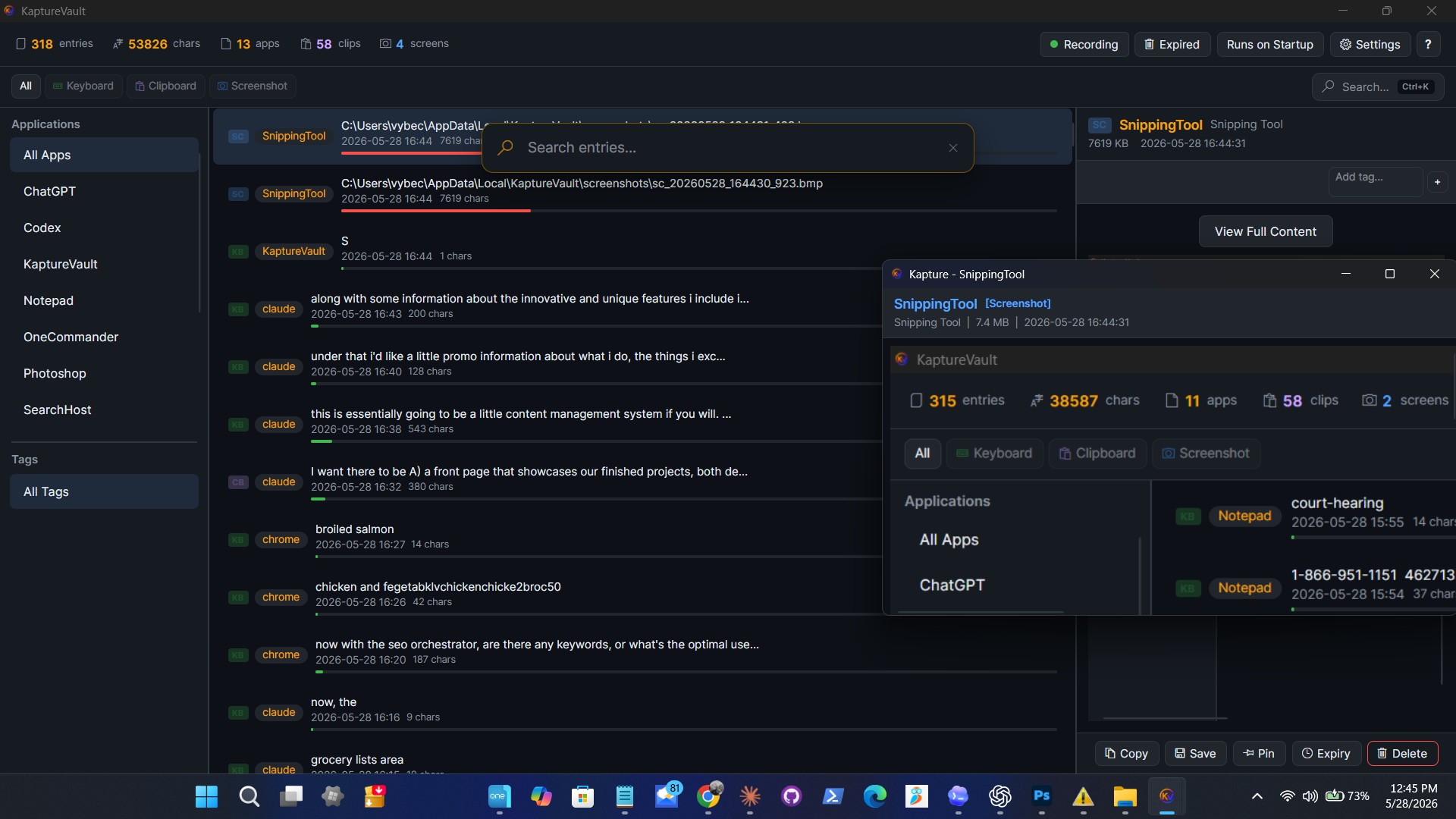
Everything you copy. Everything you type.
Always captured.
KaptureVault runs silently in the background, recording clipboard activity, keystrokes, and screenshots so you never lose important content.
Clipboard History
Every text, image, and file you copy is automatically saved and organized. Search your entire clipboard history instantly.
Keyboard Capture
Records keystrokes per application so you can recover anything you've typed — messages, documents, code, and more.
Screenshot Capture
Automatically captures screenshots and stores them with timestamps, making it easy to track visual context and changes.
Instant Search
Find any captured entry in milliseconds. Filter by application, content type, date, or keyword.
Tags & Organization
Pin important entries, tag them for quick access, and set expiry dates to auto-clean old content.
Local & Private
By default everything stays on your machine — no account, no telemetry. Optional cloud sync is end-to-end encrypted, so even then your data stays yours alone.
Screenshot Annotation
Annotate, alter, and caption any screenshot with a built-in editor. Export in multiple formats with flexible output options.
Google Drive Sync
Automatically sync your encrypted vault to Google Drive. Your data is backed up securely and accessible from anywhere.
Web Vault
Browse your entire vault from any device — phone, tablet, or another PC. Decryption happens in your browser, nothing leaves your device.
What's new
The latest changes and improvements to KaptureVault.
- NewSign in with an email and password — a Google account is no longer required.The **Login** button now lets you create a KaptureVault account, sign in, or request a password reset with just an email and password, right alongside Continue-with-Google.
- NewYour account password is kept separate from your vault password.KaptureVault won't let you set an account password equal to your vault encryption password — the account password can be reset by email, but your vault password is the only key to your encrypted data and can never be recovered.
- ImprovedThe app and installer are now digitally signed.KaptureVault is code-signed with Azure Trusted Signing, so Windows shows a verified publisher when you download and install it instead of an "unknown publisher" warning.
- NewHost files in your account, organized in folders.A new **Files** window (the Upload button) lets subscribers upload files (up to 250 MB each), put them in folders, download them, and delete them — sharing one storage quota with your Online Vault.
- NewKeep a file private, or share it with a link.Choose **Private 🔒** to encrypt a file with your vault key so only you can open it (the server only ever holds ciphertext), or **Shareable 🔗** to get a public link anyone can download. Private files can't be shared (no one else has the key), and any share link can be revoked at any time.
- NotesFile hosting is a paid feature.Free accounts see the upgrade options; the encrypted Online Vault sync remains free.
- NewYour Online Vault now syncs automatically — there's no provider to pick.Google Drive backup and the Online Vault are fully independent now. Sign in with Google and set a vault password, and your encrypted vault and your screenshots (re-encoded to PNG, end-to-end encrypted) sync to your account on their own and restore on another device — counted against your storage quota (oldest kept first when you run low). The server only ever stores ciphertext, and the vault password is the only key.
- NewOne-click access to the Online Vault, right from the main window.A new toolbar shows a **Login** button when you're signed out, and **Sync**, **Web Vault**, and **Upload** once you're signed in. The Sync icon spins while a sync is running so you can see it working.
- NewOpen the web vault already signed in.Clicking **Web Vault** hands your browser a one-time, single-use code so it logs in automatically — you just enter your vault password to decrypt. The code lives only in the URL fragment and never carries your encryption key; the server stays ciphertext-only.
- NewView your vault — including screenshots — in any browser.The web vault at `kapture.tools/vault` opens your Online Vault: enter your vault password and browse, search, and view your captured entries and screenshot images. Everything is decrypted locally in your browser.
- NewGoogle Drive backup is now its own thing.Drive backup moved to its own "Google Drive Backup" section in Settings — an optional, independent whole-vault backup you can turn on without touching the Online Vault.
- ImprovedFile hosting is on the way with KaptureVault Pro.The new **Upload** button shows the plan and pricing for free accounts (with an upgrade link); encrypted file hosting itself ships in a later update.
- FixThe app no longer closes immediately after you enter your vault password.A startup window-lifecycle bug could shut the app down right after unlocking an encrypted vault; it now opens reliably.
Get KaptureVault — free, forever.
No trials, no feature-gating, no ads. Just a powerful clipboard manager that works.
KaptureVault
Full clipboard history, keyboard capture, screenshot recording, tagging, search, and more. Runs on startup, stays out of your way.
Download for Windows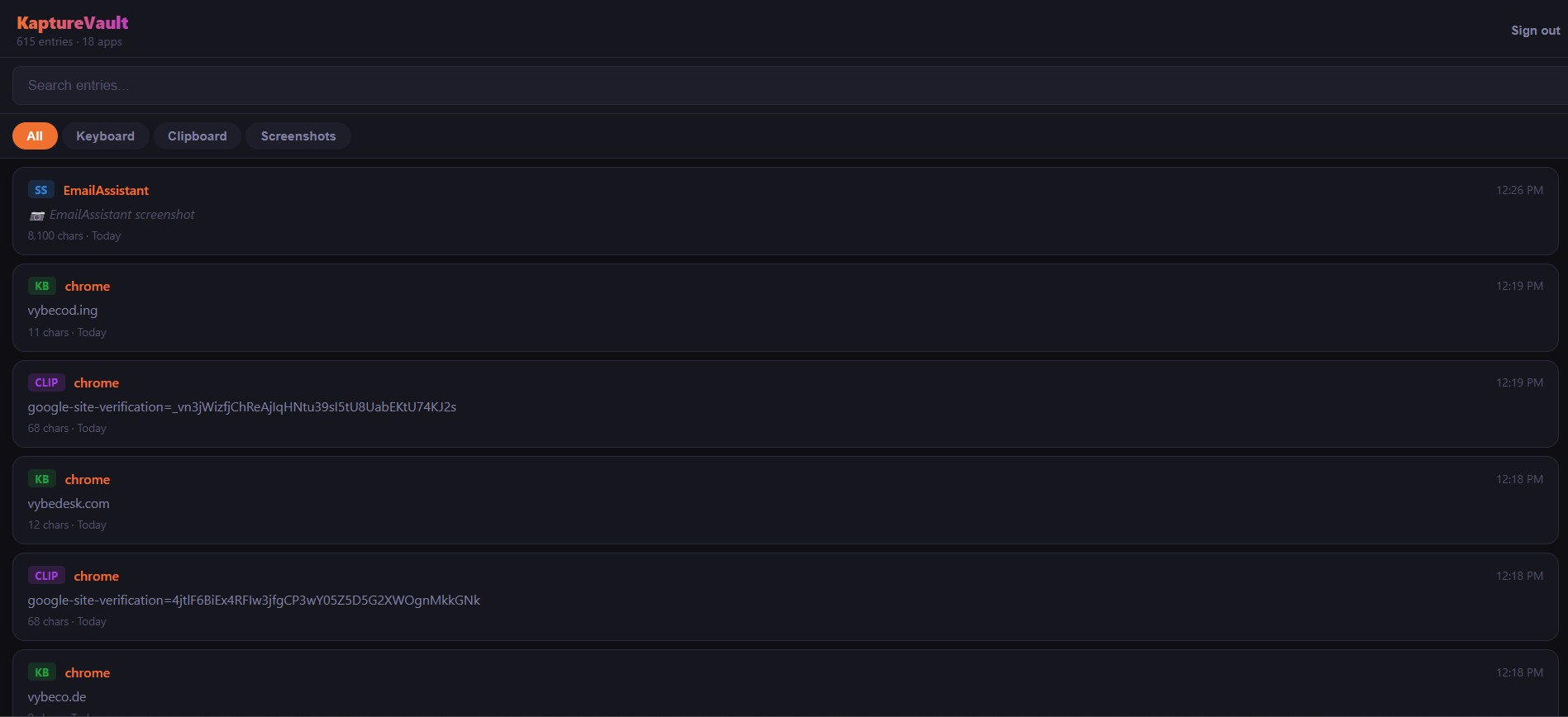
Your vault, anywhere.
Browse your entire KaptureVault from any device — phone, tablet, or another PC. Connect via Google Drive or open your vault file directly. No installs needed.
- Search and filter all entries from any browser
- Keyboard, clipboard, and screenshot entries
- End-to-end encrypted — decryption happens in your browser
- Works offline once loaded — no server-side processing
Free to use. Yours to extend.
The full capture app is free forever — no account needed. Add an optional, end-to-end-encrypted Online Vault to reach your captures on every device, and go Pro for file hosting and shareable links.
- Keystroke, clipboard & screenshot capture
- Search, tags, pinning & auto-expiry
- Screenshot annotation editor
- AES-256 encrypted local vault
- Export your vault · Google Drive sync
- Online Vault sync & web vault
- File hosting & share links
- Everything in Free
- KaptureVault account (Google or email)
- End-to-end encrypted Online Vault sync
- Screenshots sync — up to 250 MB
- Web vault — read your captures anywhere
- File hosting & share links
- Everything in Free account
- 10 GB of cloud storage
- Host files in your account, in folders
- Private, client-encrypted files
- Public share links — revoke any time
All cloud data is end-to-end encrypted — the server only ever stores ciphertext, and your vault password is the only key. Cancel anytime.
KaptureTools — the full suite.
Everything in KaptureVault, plus a complete set of system utilities. One app to manage, optimize, and maintain your PC.
System Tweaks
Fine-tune hidden Windows settings, disable telemetry, and customize your OS experience.
Memory Manager
Monitor and optimize RAM usage in real time. Free up memory with one click when things get heavy.
System Optimization
Startup management, junk cleanup, service configuration, and performance tuning — all in one place.
Driver Management
Scan, update, backup, and restore device drivers. Keep your hardware running with the latest drivers.
Frequently asked questions
What is KaptureVault?
KaptureVault is a free clipboard manager for Windows 10 and 11 that automatically captures everything you copy, type, and screenshot into a searchable, taggable local vault. It is developed by VybeCode Ltd and built on .NET and Avalonia.
Is KaptureVault free?
Yes. The full capture app — clipboard history, keystroke capture, screenshot recording, search, tags, and the annotation editor — is free forever, with no account, no trial, no ads, and no feature-gating. An optional paid Pro plan ($49/year) adds 10 GB of cloud file hosting and shareable links.
Which versions of Windows does KaptureVault support?
KaptureVault runs on Windows 10 and Windows 11 (64-bit). It installs as a standard user, runs quietly in the background, and can start automatically with Windows.
Is my data private and secure?
By default everything stays on your own machine — there is no account and no telemetry. Your local vault can be protected with AES-256 encryption, and the optional Online Vault is end-to-end encrypted: the server only ever stores ciphertext and your vault password is the only key. Every installer is also code-signed and VirusTotal-scanned.
Can I access my captures on other devices?
Yes. A free KaptureVault account adds end-to-end-encrypted Online Vault sync (up to 250 MB, including screenshots) and a web vault you can open from any phone, tablet, or PC. Decryption happens in your browser, so the server never sees your data.
How much does KaptureVault Pro cost and what does it add?
KaptureVault Pro is $49 per year (USD). It includes everything in the free account plus 10 GB of cloud storage, private client-encrypted file hosting organized in folders, and public share links you can revoke at any time. The core capture app stays free.